Ticket Terms and Conditions
1 – Introduction
1.1 – This document outlines the terms and conditions of purchase, use and application for all tickets, smartcards and mobile tickets offered by Nexus (also referred to as “our”, “us” and “we”), except for those listed in 1.2.
A PDF copy of this document has also been created.
1.2 – This document does not cover:
- Network One travel tickets, including smartcard tickets; Visit the Network One Tickets website for terms and conditions
- TaxiCard, a travel mobility scheme operated by Nexus; see this TNE page for terms and conditions
- Any special event ticket(s) issued by us from time to time, such as wristbands or concert tickets; these will have their own terms and conditions which will be communicated by us separately.
1.3 – This document does not cover any tickets issued by a third party which permit onward and/or connecting travel on our services, for example rail tickets issued by Northern.
1.4 – The terms and conditions outlined in this document supersede any previously printed terms and conditions, including guidance issued in leaflet form.
1.5 – We may update these terms and conditions from time to time; see our Terms and Conditions for the latest version.
1.6 – We retain ownership of all Nexus tickets, smartcards and mobile tickets, which must be presented for inspection when requested by our staff. Failure to do so may result in the issue of a Penalty Fare Notice and/or prosecution.
1.7 – Travelling with a Nexus ticket, smartcard or Mobile Ticket is subject to the Tyne and Wear Passenger Transport Act 1979, the byelaws which relate to Metro, Shields Ferry and Railways, the Conditions of Carriage and passenger regulations of the transport operator, and the terms and conditions set out in this document.
1.8 – The terms and conditions outlined in this document should be read in conjunction with the Conditions of Carriage and passenger regulations of the relevant transport operator, the byelaws which relate to Metro, Shields Ferry and any bus premises, and Nexus’ Privacy Notice and website policies.
1.9 – Nexus is the trading name of the Tyne and Wear Passenger Transport Executive (VAT Number 176720058), a corporate body incorporated by statute in England, whose principal place of business is The Spark, Newcastle upon Tyne, NE4 5DE.
1.10 – This document does not contain current ticket prices; these can be found online at travelnortheast.uk.
1.11 – These terms and conditions do not affect your statutory consumer rights.
Contact us
2.1 – If you have an issue with a Nexus ticket or smartcard while travelling, speak to a member of staff or seek assistance via a Metro station Help Point. If your issue cannot be resolved during your journey, if you have a general query about tickets or smartcards, or this document, or if would like to make a complaint about our tickets and smartcards, please contact Nexus Customer Relations using the details below:
Write to
Customer Relations
Nexus
Newcastle upon Tyne
NE4 5DE
Call
Customer Relations
0191 20 20 747
The Spark (9.00am-5.00pm, Monday to Friday)
Online
For any other general issues about our services not related to tickets of smartcards, see the Nexus contact form.
3 – Single and day tickets
Adult tickets
3.1 – Metro Single and Metro Day Ticket
| Metro Single | Metro Day Ticket | |
|---|---|---|
| Durations available | Valid for one single journey, including interchange between services where necessary, which must be made within 90 minutes of the time of purchase. | Valid for unlimited travel on the day of purchase. |
| Zone map | Metro (see Appendix 1) | |
| Zones available |
|
|
| Services valid on |
|
|
| Ticket format | Paper ticket | |
| Monday–Friday validity | All day | |
| Weekend validity | All day | |
| Public Holiday validity | All day (where service operates) | |
| Purchase locations | Metro station ticket machines |
|
| Transferable | No – can only be used by the person who purchases the ticket | |
| Replacements | Not available – a new ticket must be purchased if lost or damaged | |
| Refunds | Not available except in the event of Metro service delays (see section 11) | |
| Advance purchase | Not available – must be used within 90 minutes of the time of purchase | Not available – must be used on the day of purchase |
| Information | www.travelnortheast.uk/tickets/buy-tickets/?selected_ticket=11&transport=6 | |
3.2 – Ferry Single and Ferry Day Ticket
| Ferry Single | Ferry Day Ticket | |
|---|---|---|
| Durations available | Valid for one single journey | Valid for unlimited travel on the day of purchase |
| Services valid on | Shields Ferry (including bus services 19 and 317 between North Shields Ferry Duke Street and North Shields Transport Hub) | |
| Ticket format | Paper ticket | |
| Monday–Friday validity | All day | |
| Weekend validity | All day | |
| Public Holiday validity | All day (where service operates) | |
| Purchase locations | On board the ferry | |
| Transferable | No – can only be used by the person who purchases the ticket | |
| Replacements | Not available – a new ticket must be purchased if lost or damaged | |
| Refunds | Not available | |
| Advance purchase | Not available | Not available – must be used on the day of purchase |
| Information | www.travelnortheast.uk/tickets/buy-tickets/?selected_ticket=11&transport=8 | |
3.3 – Adult Transfare
| Adult Transfare | ||
|---|---|---|
| Durations available | Valid for one single journey of two legs on different services, the second leg of which must begin within 90 minutes of purchase. | |
| Zone map | Transfare (see Appendix 3) | |
| Zones available |
|
|
| Services valid on |
|
|
| Ticket format | Paper ticket | |
| Monday–Friday validity | All day | |
| Weekend validity | All day | |
| Public Holiday validity | All day (where service operates) | |
| Purchase locations |
|
|
| Transferable | No – can only be used by the person who purchased the ticket | |
| Replacements | Not available – a new ticket must be purchased if lost or damaged | |
| Refunds | Not available except in the event of Metro service delays (see section 11) | |
| Advance purchase | Not available – the second leg of the journey must begin within 90 minutes of purchase | |
| Information | https://travelnortheast.uk/tickets/buy-tickets/?passenger=39 | |
Concessionary child tickets
The tickets in this section are for children aged 5-15 who have an Under 16 Pop card. Additional terms and conditions apply to Under 16 Pop cards (see 6.1-6.17 and 6.25).
3.4 – Concessionary Child Single Metro and Ferry
| Concessionary Child Single (Metro) | Concessionary Child Single (Ferry) | |
|---|---|---|
| Eligibility and smartcard required | Ticketholder must be aged 5–15 and have an Under 16 Pop card (see 6.25). | |
| Durations available | Valid for one single journey, which must be made within 90 minutes of the time of purchase. | |
| Zone map | Metro (see Appendix 1) | N/A – valid only on Ferry |
| Zones available | Three zones (A+B+C) | N/A – valid only on Ferry |
| Services valid on | Metro | Shields Ferry (including bus services 19 and 317 between North Shields Ferry Duke Street and North Shields Transport Hub) |
| Ticket format | Paper ticket, which can only be purchased with and must be accompanied by an Under 16 Pop card when travelling. | |
| Monday–Friday validity | All day | |
| Weekend validity | All day | |
| Public Holiday validity | All day (where service operates) | |
| Purchase locations | Metro station ticket machines | On board the ferry |
| Transferable | No – can only be used by the Under 16 Pop card holder | |
| Replacements | Not available – a new ticket must be purchased if lost or damaged | |
| Refunds | Not available | |
| Advance purchase | Not available | |
| Information | https://www.travelnortheast.uk/tickets/buy-tickets/metro-child-single/ | https://www.travelnortheast.uk/tickets/buy-tickets/child-concessionary-single-ferry-fare/ |
3.5 – Child All-day Ticket (U16 CAT)
| Child All-day Ticket (U16 CAT) | |
|---|---|
| Eligibility and smartcard required | Ticketholder must be aged 5-15 and have an Under 16 Pop card (see 6.25) |
| Durations available | Valid for unlimited travel on the day of purchase |
| Zone map | Metro (see Appendix 1) |
| Zones available | Three zones (A+B+C) |
| Services valid on |
|
| Ticket format | Paper ticket, which can only be purchased with and must be accompanied by an Under 16 Pop card when travelling. |
| Monday–Friday validity | All day |
| Weekend validity | All day |
| Public Holiday validity | All day (where service operates) |
| Purchase locations |
|
| Transferable | No – can only be used by the Under 16 Pop card holder |
| Replacements | Not available – a new ticket must be purchased if lost or damaged |
| Refunds | Not available except in the event of Metro service delays (see section 11) |
| Advance purchase | Not available – must be used on the day of purchase |
| Information | www.travelnortheast.uk/tickets/buy-tickets/under-16-child-all-day-ticket-u16-cat/ |
Commercial child tickets
The tickets in this section are for children aged 5-15 who do not have an Under 16 Pop card.
3.6 – Metro Child Single and Metro Child Day Ticket
| Metro Child Single | Metro Child Day Ticket | |
|---|---|---|
| Eligibility | You must be aged 5-15 (accompanied children aged under 5 travel for free). Valid ID may be required. Acceptable ID includes PASS card, NHS card, passport or birth certificate. | |
| Durations available | Valid for one single journey within 90 minutes | Valid for unlimited travel on the day of purchase |
| Zone map | Metro (see Appendix 1) | |
| Zones available | Three zones (A+B+C) | |
| Services valid on | Metro |
|
| Ticket format | Paper ticket | Paper ticket (also purchasable with a Junior Blue card on the ferry) |
| Monday–Friday validity | All day | |
| Weekend validity | All day | |
| Public Holiday validity | All day (where service operates) | |
| Purchase locations | Metro station ticket machines |
|
| Transferable | No – can only be used by the purchaser | |
| Replacements | Not available | |
| Refunds | Not available | |
| Advance purchase | Must be used within 90 minutes | Must be used on the day of purchase |
| Information | www.travelnortheast.uk/tickets/buy-tickets/metro-child-single/ | https://www.travelnortheast.uk/tickets/buy-tickets/metro-child-day-ticket/ |
3.7 – Ferry Child Single
| Ferry Child Single | |
|---|---|
| Eligibility | You must be aged 5-15 (accompanied children aged under 5 travel for free on all public transport in Tyne and Wear). To verify your eligibility, you may be asked by staff to present valid photographic ID at any time when travelling with a commercial child ticket. If you are unable to do so, or the ID you provide does not satisfactorily prove your age, you may be issued with a Penalty Fare Notice. Acceptable forms of ID are: o ID card with the PASS hologram o NHS Medical card o Passport or birth certificate (copies will be accepted, including electronic versions). |
| Durations available | Valid for one single journey |
| Services valid on | Shields Ferry (including bus services 19 and 317 between North Shields Ferry Duke Street and North Shields Transport Hub) |
| Ticket format | Paper ticket, which can also be purchased using a Junior Blue card |
| Monday – Friday validity | All day (including weekends and public holidays) |
| Weekend validity | All day |
| Public Holiday validity | All day |
| Purchase locations | On board the ferry |
| Transferable | No – can only be used by the person who purchases the ticket |
| Replacements | Not available – a new ticket must be purchased if lost or damaged |
| Refunds | Not available |
| Advance purchase | Not available |
| Information | https://www.travelnortheast.uk/tickets/buy-tickets/child-concessionary-single-ferry-fare/ |
3.8 – Child Transfare
| Child Transfare | |
|---|---|
| Eligibility | You must be aged 5-15 (accompanied children aged under 5 travel for free on all public transport in Tyne and Wear). To verify your eligibility, you may be asked by staff to present valid photographic ID at any time when travelling with a commercial child ticket. If you are unable to do so, or the ID you provide does not satisfactorily prove your age, you may be issued with a Penalty Fare Notice. Acceptable forms of ID are: o ID card with the PASS hologram o NHS Medical card Passport or birth certificate (copies will be accepted, including electronic versions). |
| Durations available | Valid for one single journey of two legs on different services, the second leg of which must begin within 90 minutes of purchase. |
| Zone map | Transfare (see Appendix 3) |
| Zones available | Three zones (Yellow+Green+Grey) |
| Services valid on |
|
| Ticket format | Paper ticket |
| Monday – Friday validity | All day |
| Weekend validity | All day |
| Public Holiday validity | All day (where service operates) |
| Purchase locations | Metro station ticket machines, on board the ferry, from bus drivers |
| Transferable | No – can only be used by the person who purchases the ticket |
| Replacements | Not available – a new ticket must be purchased if lost or damaged |
| Refunds | Not available |
| Advance purchase | Not available |
| Information | https://www.travelnortheast.uk/tickets/buy-tickets/child-transfare/ |
Concessionary adult tickets
The tickets in this section are for adults who have a Concessionary Travel (CT) Pass or Companion Card. Additional terms and conditions apply to CT Passes (see 6.23), and Companion Cards (see 6.24).
3.9 – Concessionary Ferry Single and Concessionary Rail Single
| Concessionary Ferry Single | Concessionary Rail Single | |
|---|---|---|
| Eligibility and smartcard required | You must have a valid CT Pass (see 6.23) or Companion Card (see 6.24) | |
| Durations available | One continuous journey | |
| Services valid on | Shields Ferry (including bus services 19 and 317 between North Shields Ferry Duke Street and North Shields Transport Hub) | Northern rail services between Newcastle and Metrocentre/Blaydon |
| Ticket format | Paper ticket, which can only be purchased with and must be accompanied by a Concessionary Travel Pass when travelling | |
| Monday–Friday validity | After 9.30am | |
| Weekend validity | All day | |
| Public Holiday validity | All day (where service operates) | |
| Purchase locations | On board the ferry | From train conductors |
| Transferable | No- can only be used by the person who purchases the ticket | |
| Replacements | No – A new ticket must be purchased if lost or damaged | |
| Refunds | Not available | |
| Advance purchase | No– ticket can only be purchased for travel on the same day | |
| Information | https://www.travelnortheast.uk/tickets/buy-tickets/under-16-child-all-day-ticket-u16-cat/ | https://www.travelnortheast.uk/tickets/buy-tickets/concessionary-rail-fare/ |
4 – Pay As You Go (PAYG)
This section is for customers who have Pop PAYG on Android or a Pop PAYG, Pop 19-21, Pop Blue or Junior Blue card. Additional terms and conditions apply to Pop PAYG on Android and Pop PAYG, Pop 19-21, Pop Blue and Junior Blue cards (see 6.1-6.17, 6.19, 6.20 and 6.21).
4.1 – Pop PAYG
| Pop PAYG on smartcard | Pop PAYG on Android | |
|---|---|---|
| Eligibility | N/A | |
| Media required | Pop PAYG card (see 6.19) | Near Field Communication (NFC) enabled Android smartphone with a Google Pay account. |
| Durations available | Valid as long as you have a positive balance when starting a journey. | |
| Zone map | Metro (see Appendix 1) | |
| Zones available | You will automatically be charged for the number of zones you travel in each day. | |
| Services valid on |
|
|
| Ticket format | Balance that is loaded onto a Pop PAYG card | Balance that is stored in your Google Pay wallet. |
| Monday-Friday validity | All day | |
| Weekend validity | All day | |
| Public Holiday validity | All day (where service operates) | |
| Balance top ups |
|
|
| Transferable | No | |
| Replacements | See 6.19 | N/A – PAYG balance remains linked to your Google Pay account. |
| Refunds | Available for unused balance (see 6.19) | Available for unused balance by selecting ‘Request a Refund’ through your Google Pay wallet. |
| Advance purchase | Balance can be topped up at any time | |
4.2 – Pop Blue and Junior Blue
| Pop Blue | Junior Blue | |
|---|---|---|
| Eligibility | You must be aged 21 or under | You must be aged 5-15 |
| Smartcard required | Pop Blue card (see 6.21) Pop 19-21 card (see 6.20) | Junior Blue card (see 6.21) |
| Durations available | Valid as long as the card has a positive balance when starting a journey | |
| Zone map | Metro (see Appendix 1) | |
| Zones available | Four zones (A+B+C+D) | |
| Services valid on |
|
|
| Ticket format | Balance that is loaded onto a Pop Blue card or a Pop 19-21 card | Balance that is loaded onto a Junior Blue card |
| Monday-Friday validity | All day | |
| Weekend validity | All day | |
| Public Holiday validity | All day | |
| Card balance top up locations |
|
|
| Transferable | No – a smartcard can only be used by the person to whom it was issued | |
| Replacements | See 6.20 | |
| Refunds | Available for unused balance | |
| Advance purchase | Balance can be purchased and loaded onto smartcard at any time | |
4.3 – PAYG Ferry Single and PAYG Ferry Day Ticket
| PAYG Ferry Single | PAYG Ferry Day Ticket | |
|---|---|---|
| Smartcard required | Pop PAYG card (see 6.19) | |
| Durations available | Valid for one single journey | Valid for unlimited travel on the day of purchase |
| Zone map | Valid only on the Shields Ferry | |
| Zones available | Valid only on the Shields Ferry | |
| Services valid on | Shields Ferry (includes bus services 19 and 317 between North Shields Ferry Duke Street and North Shields Transport Hub) | |
| Ticket format | The fare is deducted from your Pop PAYG card balance, and a paper ticket issued for travel. | |
| Monday-Friday validity | All day | |
| Weekend validity | All day | |
| Public Holiday validity | All day (where service operates) | |
| Purchase locations | On board the ferry | |
| Transferable | No – can only be used by the Pop PAYG card holder | |
| Replacements | Not available – a new ticket must be purchased if the paper ticket issued is lost or damaged | |
| Refunds | Not available | |
| Advance purchase | Not available | |
4.4 – 21 and Under Ferry Single and 21 and Under Ferry Day Ticket
| 21 and Under Ferry Single | 21 and Under Ferry Day Ticket | |
|---|---|---|
| Eligibility and smartcard required | Pop Blue card (see 6.21) Pop 19-21 card (see 6.20) | |
| Durations available | Valid for one single journey | Valid for unlimited travel on the day of purchase |
| Zones available | n/a – only valid on the Shields Ferry | |
| Ticket format | The fare is deducted from your Pop Blue card balance, and a paper ticket issued for travel. | |
| Services valid on | Shields Ferry (includes bus services 19 and 317 between North Shields Ferry Duke Street and North Shields Transport Hub) | |
| Monday-Friday validity | All day | |
| Weekend validity | All day | |
| Public Holiday validity | All day (where service operates) | |
| Purchase locations | On board the ferry | |
| Transferable | No – can only be used by the Pop Blue or Pop 19-21 card holder | |
| Replacements | Not available – a new ticket must be purchased if the paper ticket issued is lost or damaged | |
| Refunds | Not available | |
| Advance purchase | Not available | |
5 – Season tickets
5.1 – Metro Season Ticket (Smartcard ticket)
|
Metro Season Ticket (Smartcard ticket) Additional terms and conditions apply to Pop cards (see 6.1-6.17) |
||
|---|---|---|
| 1 Week Also available as a Mobile Ticket on Pop app (see 5.2) or as a paper ticket (see 5.3) |
4 Week & Annual | |
| Smartcard required | Pop card (see 6.18) | |
| Durations available | 1 week | • 4 weeks • Annual |
| Zone map | Metro (see Appendix 1) | |
| Zones available |
|
|
| Services valid on |
|
|
| Ticket format | Smart ticket that is loaded onto a Pop card | |
| Monday-Friday validity | All day | |
| Weekend validity | All day | |
| Public Holiday validity | All day (where service operates) | |
| Purchase locations |
|
|
| Transferable | No – can only be used by the Pop card holder | |
| Replacements | Can be replaced if the Pop card is registered | |
| Refunds | Not available, except in the event of Metro service delays when we will refund the cost of a single journey Metro ticket (see section 11) | Refunds are available for future unused travel, and in the event of Metro service delays when we will refund the cost of a single journey Metro ticket (see 11). |
| Advance purchase | Can be purchased up to 7 days in advance of the start date | |
| Information | www.travelnortheast.uk/tickets/buy-tickets/metro-season-ticket/ | |
5.2 – 1 Week Metro Season Ticket (Mobile Ticket on Pop app)
| 1 Week Metro Season Ticket (Mobile Ticket on Pop app) | |
|---|---|
| Also available as a smartcard ticket (see 5.1) and as a paper ticket (see 5.3)Additional terms and conditions apply to the Pop app (see 7) | |
| Durations available | 1 week |
| Zone map | Metro (see Appendix 1) |
| Zones available |
|
| Services valid on |
|
| Ticket format | Mobile Ticket stored in the Pop app on an Android device |
| Monday-Friday validity | All day |
| Weekend validity | All day |
| Public Holiday validity | All day (where service operates) |
| Purchase locations | Via the Pop app |
| Transferable | No – can only be used by the person who purchases the ticket |
| Replacements | Not available – a new ticket must be purchased if lost or damaged |
| Refunds | Not available, except in the event of Metro service delays when we will refund the cost of a single journey Metro ticket (see section 11) |
| Advance purchase | Can be purchased up to 7 days in advance of the start date |
| Information | www.travelnortheast.uk/tickets/buy-tickets/metro-season-ticket/ |
5.3 – 1 Week Metro Season Ticket (Paper ticket)
| 1 Week Metro Season Ticket (Paper ticket)
Also available as a smartcard ticket (see 5.1) or as a Mobile Ticket on Pop app (see 5.2) |
|
|---|---|
| Durations available | 1 week |
| Zone map | Metro (see Appendix 1) |
| Zones available |
|
| Services valid on |
|
| Ticket format | Paper ticket |
| Monday-Friday validity | All day |
| Weekend validity | All day |
| Public Holiday validity | All day (where service operates) |
| Purchase locations | Metro station ticket machines |
| Transferable | No – can only be used by the person who purchases the ticket |
| Replacements | Not available – a new ticket must be purchased if lost or damaged |
| Refunds | Not available, except in the event of Metro service delays when we will refund the cost of a single journey Metro ticket (see section 11) |
| Advance purchase | Can be purchased up to 7 days in advance of the start date |
| Information | www.travelnortheast.uk/tickets/buy-tickets/metro-season-ticket/ |
5.4 Student Metro Season Ticket
| Student Metro Season Ticket | |
|---|---|
| Eligibility and smartcard required | You must be a student and have a Pop card with a Student entitlement (see 6.18) that is valid for the full duration of the ticket. You may be asked by staff to present photographic ID as proof of eligibility at any time when travelling with a Student Metro Season Ticket. If you are unable to do so, or the ID you provide does not satisfactorily prove you are a student, you may be issued with a Penalty Fare Notice. Acceptable forms of ID are:
|
| Durations available |
|
| Zone map | Metro student (see Appendix 2) |
| Zones available |
|
| Services valid on |
|
| Ticket format | Smart ticket that is loaded onto a Pop card |
| Monday-Friday validity | All day |
| Weekend validity | All day |
| Public Holiday validity | All day (where service operates) |
| Purchase locations |
|
| Transferable | No – can only be used by the Pop card or Newcastle University Student ID card holder |
| Replacements | Can be replaced if the Pop card or Newcastle University Student ID card is registered. |
| Refunds | Available for future unused travel, and in the event of Metro service delays when we will refund the cost of a single journey Metro ticket (see 11). |
| Advance purchase | Can be purchased up to 7 days in advance of the start date |
| Information | www.travelnortheast.uk/tickets/buy-tickets/student-metro-season-ticket/ |
5.5 – 18 and Under Metro Season Ticket
| 18 and Under Metro Season Ticket | |
|---|---|
| Eligibility and smartcard required | You must be aged 18 or under and have a Pop card with an 18 and Under entitlement (see 6.18) that is valid for the full duration of the ticket. You may be asked by staff to present photographic ID as proof of eligibility at any time when travelling with an 18 and Under Metro Season Ticket. If you are unable to do so, or the ID you provide does not satisfactorily prove you are aged 18 or under, you may be issued with a Penalty Fare Notice. Acceptable forms of ID are:
|
| Durations available |
|
| Zone map | Metro (see Appendix 1) |
| Zones available | All zones (A+B+C) |
| Services valid on |
|
| Ticket format | Smart ticket that is loaded onto a Pop card with an 18 and Under entitlement |
| Monday-Friday validity | All day |
| Weekend validity | All day |
| Public Holiday validity | All day (where service operates) |
| Purchase locations |
|
| Transferable | No – can only be used by the person whose photograph is shown on the Pop card |
| Replacements | 18 and Under Metro Season Tickets loaded onto a Pop card can be replaced if the Pop card is registered online |
| Refunds | Available for future unused travel, and in the event of Metro service delays when we will refund the cost of a single journey Metro ticket (see 11). |
| Advance purchase | Can be purchased up to 7 days in advance of the start date |
| Information | www.travelnortheast.uk/tickets/buy-tickets/18-and-under-metro-season-ticket/ |
5.6 Corporate Metro Season Ticket
| Corporate Metro Season Ticket | |
|---|---|
| Eligibility and smartcard required | Your employer must be a member of the Nexus Corporate scheme. A Corporate Pop card (see 6.22) is required, which can only be issued through the scheme. |
| Durations available | Annual |
| Zone map | Metro (see Appendix 1) |
| Zones available | All zones (A+B+C) |
| Services valid on |
|
| Ticket format | Smart ticket that is loaded onto a Corporate Pop card |
| Monday-Friday validity | All day |
| Weekend validity | All day |
| Public Holiday validity | All day (where service operates) |
| Purchase locations | Corporate Metro Season Tickets are only available through the Corporate Ticket Scheme, see www.travelnortheast.uk/tickets/buy-tickets/corporate-metro-season-ticket/ for information |
| Transferable | No – can only be used by the person whose photograph is shown on the Corporate Pop card |
| Replacements | See www.travelnortheast.uk/tickets/buy-tickets/corporate-metro-season-ticket/ for information |
| Refunds | |
| Advance purchase | |
| Information | www.travelnortheast.uk/tickets/buy-tickets/corporate-metro-season-ticket/ |
5.7 – Ferry Season Ticket
| 1 Week | 4 Weeks | |
|---|---|---|
| Smartcard required | No smartcard required | |
| Description | Valid for an unlimited number of journeys | |
| Durations available | One week | Four weeks |
| Services valid on | Shields Ferry (includes bus services 19 and 317 between North Shields Ferry Duke Street and North Shields Transport Hub) | |
| Ticket format | Paper ticket | |
| Monday-Friday validity | All day | |
| Weekend validity | All day | |
| Public Holiday validity | All day (where service operates) | |
| Purchase locations | On board the ferry | |
| Transferable | No – can only be used by the person who purchases the ticket | |
| Replacements | Not available – a new ticket must be purchased if lost or damaged | |
| Refunds | Not available | Available for future unused travel. |
| Advance purchase | Not available | Can be purchased up to 7 days in advance of the start date. |
| Information | www.travelnortheast.uk/tickets/buy-tickets/ferry-season-ticket/ | |
5.8 – Metro Gold Card
| Metro Gold Card | |
|---|---|
| Eligibility and smartcard required | You must have a valid CT Pass (see 6.23) or Companion Card (see 6.24) |
| Durations available | Annual |
| Zone map | Metro (see Appendix 1) |
| Zones available | All zones (A+B+C) |
| Ticket format | This ticket can only be loaded onto a valid CT Pass or Companion Card. Paper ticket alternatives are not available. |
| Services valid on |
|
| Monday-Friday validity |
*All day during July and August |
| Weekend validity | All day |
| Public Holiday validity | All day (where service operates) |
| Purchase location(s) | Metro station ticket machines |
| Transferable | No – can only be used by the person whose photograph is shown on the smartcard |
| Replacements | Available for a Metro Gold Card loaded onto a faulty CT Pass (see 6.23) or Companion Card (see 6.24) |
| Refunds | Not available |
| Advance purchase | Can be purchased up to 7 days in advance of the start date |
| Information | www.travelnortheast.uk/tickets/buy-tickets/metro-gold-card/ |
6 – Smartcards
General terms and conditions for all smartcards
6.1 – You must always carry your smartcard with you when travelling. Copies of smartcards will not be accepted.
6.2 – A smartcard and any ticket loaded onto it must be valid for the journey being made. If it is not, you may be refused travel and be liable for a Penalty Fare Notice.
6.3 – We reserve the right to block or withdraw a smartcard or prevent its use on our services if it has been, or we suspect it has been, tampered with or modified in any way.
6.4 – We reserve the right to confiscate a Pop card with a photograph or an Under 16 Pop card if we suspect it is being used by someone other than the person named and/or whose photograph is shown on the card.
6.5 – We reserve the right to confiscate a smartcard if you are unable to provide acceptable proof of eligibility upon request by a member of staff or other authorised officer.
6.6 – Anyone found to be using a smartcard fraudulently may be liable for a Penalty Fare Notice or prosecution.
6.7 – A smartcard is not transferable and can only be used by the person named on the smartcard, whose photograph is shown on it, or to whom it was issued.
6.8 – We retain ownership of all smartcards.
6.9 – Where a photograph is shown on a smartcard, it must show a true likeness of the cardholder. If the cardholder’s appearance changes significantly, they must get a new smartcard. We reserve the right to refuse travel or confiscate a smartcard with a photograph if we suspect it is being used by someone other the person named and/or whose photograph is shown on it.
6.10 – The person to whom a smartcard is issued is responsible for the use of that smartcard, including notifying us if it is lost, stolen, damaged or faulty.
6.11 – If you forget your smartcard when travelling on Metro, you must purchase a valid ticket before travelling, or you may be liable for a Penalty Fare Notice. We will not refund the cost of any additional tickets purchased during this time.
Issuing of smartcards
6.12 – Postage of smartcards is free but is only available to UK postal addresses.
6.13 – We accept no liability for expenses incurred by you whilst awaiting delivery of a smartcard, including losses arising from delays to the card being delivered.
6.14 – If you have not received your smartcard 15 days after submitting an application or order and we have not contacted you, please contact Nexus Customer Relations using the details in 2.1.
Registering a smartcard
6.15 – Only Pop card, Pop PAYG cards, Pop 19-21 cards, Pop Blue cards and Junior Blue cards can be registered. Under 16 Pop cards, Concessionary Travel passes, Companion cards and Corporate Pop cards cannot be registered.
6.16 – Pop cards, Pop PAYG cards, Pop Blue cards and Junior Blue cards ordered online will be automatically registered to the online account you set up when ordering the card.
6.17 – If you ordered a Pop card, Pop PAYG card or Pop Blue card online before 1st October 2019, or obtained your Pop PAYG card or Pop Blue card in a Nexus TravelShop, you can register your card online at buyandapply.nexus.org.uk using the ‘Register an existing card’ option.
6.18 – Pop card
| Pop card | ||
|---|---|---|
| Tickets available to load onto smartcard |
|
|
| Ordering a card |
|
|
| Entitlements | 18 and under | 18 and Under An entitlement will be added to your Pop card as the same time as it is issued. You will need to upload proof that you are aged 18 or under when ordering your card. Acceptable forms of proof are:
Your entitlement will expire on your 19th birthday, after which you will not be able to purchase 18 and Under Metro Season Tickets. Your entitlement must be valid for the full duration of the ticket you purchase. If you purchase a ticket whose expiry date is after the expiry date of your entitlement, you may be liable for a Penalty Fare Notice if you are stopped by staff whilst travelling. |
| Student |
|
|
| Buying and loading a Metro season ticket | At a Metro station ticket machine | Follow the instructions on screen after completing payment and present your Pop card to the card reader when prompted. |
| Online |
|
|
| Travelling | On Metro |
|
| On bus services 53, 54 and Q3 | Present your Pop card to the bus driver when boarding. | |
| On Northern rail services | Staff on Northern trains and the National Rail ticket gates at Newcastle station are currently unable to read Pop cards. If you wish to travel on Northern rail services, you will need to obtain a free paper counterpart ticket by contacting Nexus Customer Relations. You must carry this paper counterpart ticket with your Pop card at all times when travelling on Northern rail services and present it when requested by a member of staff. | |
| Refunds for future unused travel |
Price paid for Number of full Refund season ticket Administration = x days remaining on – amount Duration of season fee season ticket ticket in days
Refunds are by cheque, which can only be made payable to the holder of the online account to which the Pop card is registered or the person whose photograph is shown on the Pop card. |
|
| Replacements | Lost, stolen
or damaged card |
|
| Faulty card |
Where applicable, a replacement for a faulty Pop card will be issued with a partial season ticket with the same expiry date as the original season ticket. The expiry date of a season ticket issued on a replacement Pop card cannot be changed. |
|
6.19 Pop PAYG card
| Pop PAYG card | |
|---|---|
| Ordering a card |
|
| Topping up |
Online
At a Metro station ticket machine
|
| Travelling |
On Metro
On the Shields Ferry
On local bus services
|
| Refunds | Card balance refunds
Close Your Journey refunds (Metro)
Card deposit
|
| Replacements | Lost, damaged or stolen card
Faulty card
|
6.20 – Pop 19-21 card
| Pop 19-21 card | |
|---|---|
| Ordering a card | As of 7th May 2023, eligibility for Pop Blue (see 6.21) has been expanded to 19, 20 and 21 year olds, and new Pop 19-21 cards are no longer being issued. |
| Topping up |
Online
At a Metro station ticket machine
|
| Travelling |
On Metro
On the Shields Ferry
On local bus services
|
| Refunds | Card balance refunds
Close Your Journey refunds (Metro)
|
| Replacements | Lost, damaged or stolen card
Faulty card
|
6.21 – Pop Blue card and Junior Blue card
| Pop Blue card | Junior Blue card | |
|---|---|---|
| Eligibility | • You must be aged 21 or under. • To verify your eligibility, you may be asked by staff to present valid photographic ID at any time when travelling with a Pop Blue card. If you are unable to do so, or the ID you provide does not satisfactorily prove your age, you may be issued with a Penalty Fare Notice. • Acceptable forms of ID are: o Full or provisional UK/EU driving licence o ID card with the PASS hologram o TOTUM (formerly NUS extra) card o Passport or birth certificate (copies will be accepted, including electronic versions) |
o You must be aged 5-15 (accompanied children aged under 5 travel for free on all public transport in Tyne and Wear). o To verify your eligibility, you may be asked by staff to present valid photographic ID at any time when travelling with a Junior Blue card. If you are unable to do so, or the ID you provide does not satisfactorily prove your age, you may be issued with a Penalty Fare Notice. • Acceptable forms of ID are: o ID card with the PASS hologram o NHS Medical card o Passport or birth certificate (copies will be accepted, including electronic versions). |
| Ordering a card | • You can order a card online at nexus.org.uk. travelnortheast.uk • Cards are free but must be purchased with an initial £5 balance. • A smartcard ordered online will normally be delivered within 5 working days (Monday-Friday, excluding Bank Holidays), but this may be longer during busy periods. |
|
| Topping up | • You can top up online at buyandapply.nexus.org.uk or at a Metro station ticket machine. • The maximum balance that can be loaded onto a smartcard is £90. • After you purchase a top up, you must load it onto your smartcard by presenting it to the orange card reader on a Metro station ticket machine, gate or validator. Top ups can also be loaded on the following bus services: Durham Park & Ride, Stanley Travel 40, 40A and 40B, and Local Link services in Redcar & Cleveland.Online • You can only top up online if your smartcard is registered. • An online top up may take up to 48 hours to be ready to load onto your smartcard. If your top up is not showing after 48 hours but you have been charged for the transaction, contact Nexus Customer Relations using the details in 2.1.At a Metro station ticket machine • After payment has been completed, you must present your smartcard to the card reader again to load the balance you have purchased onto your card. If you fail to do this your top up will be cancelled. In such circumstances, the money will be refunded to your bank account within 7 days or the cash returned to you by the Metro station ticket machine. |
|
| Travelling | • You must have a positive balance (£0.00 or more) on your card to start any journey. • You can travel or buy tickets if the cost of your journey takes your card from a positive balance into a negative balance, but you cannot start a journey if you have a negative balance. |
|
| – On Metro | • You must validate your smartcard by touching in at the start and touching out at the end of every journey you make, using ticket gates and validators at Metro stations. • If you fail to touch in at the start of your journey you will be deemed to be travelling without a valid ticket and may be liable for a Penalty Fare Notice and/or prosecution. • For your first journey of the day, you will be charged the £1 Pop Blue single fare, irrespective of the number of zones you travel in. • For the second journey of the day, you will be charged a further £1 Pop Blue single fare, irrespective of the number of zones you travel in. For the third journey of the day, you will be charged £0.20, bringing your cost of Metro travel for the day to £2.20, triggering the daily price cap and meaning that you will not be charged for any additional journeys you make that day. |
• You must validate your smartcard by touching in at the start and touching out at the end of every journey you make, using ticket gates and validators at Metro stations. • If you fail to touch in at the start of your journey you will be deemed to be travelling without a valid ticket and may be liable for a Penalty Fare Notice and/or prosecution. • For your first journey of the day, you will be charged the £1 Junior Blue single fare, irrespective of the number of zones you travel in. • For the second journey of the day, you will be charged a further 70p, irrespective of the number of zones you travel in. This will bring your cost of Metro travel for the day to £1.70, triggering the daily price cap and meaning that you will not be charged for any additional journeys you make that day. |
| – On the Shields Ferry | • You can use the balance on your Pop Blue card to purchase an 18 and Under Ferry Single or 18 and Under Ferry Day Ticket on the Shields Ferry. • The Shields Ferry is not included in the Metro daily cap, therefore any tickets purchased on the Shields Ferry using the balance on a Pop Blue card are separate and in addition to any Pop Blue fares on Metro and/or tickets purchased using the balance on a Pop Blue card on local bus services. • If you purchase an 18 and Under Ferry Day Ticket, you must retain the paper ticket issued to you by the ferry crew to make subsequent journeys on the same day. If you are unable to present your paper ticket when boarding the ferry for subsequent journeys, you will have to buy a new ticket. |
• You can use the balance on your Junior Blue card to purchase a Ferry Child Single (see 3.8) or a Metro Child Day Ticket (see 3.7) on the Shields Ferry. • The Shields Ferry is not included in the Metro daily cap, therefore any tickets purchased on the Shields Ferry using the balance on a Junior Blue card are separate and in addition to Junior Blue fares on Metro and/or tickets purchased using the balance on a Junior Blue card on local bus services. o If you purchase a Metro Child Day Ticket using the balance on a Junior Blue on the Shields Ferry, you can subsequently use it on Metro by showing the paper ticket issued to you by the ferry crew to staff as proof of purchase. o If you wish to travel on the Shields Ferry after travelling on Metro, you should purchase a Metro Child Day Ticket as a paper ticket from a Metro station ticket machine and show it to the ferry crew when boarding. |
| – On local bus services | • You can use the balance on your Pop Blue or Junior Blue card to purchase the operator’s own standard commercial single, return and day tickets on local bus services. The pricing and availability of these tickets is controlled by the bus operator, over which Nexus has no control. • Concessionary Child tickets cannot be purchased using a Junior Blue card. • The tickets you can purchase with a Pop Blue or Junior Blue card is subject to the bus operator’s own criteria for the acceptance of the card, and tickets are offered at the operator’s discretion. • Local bus services are not included in the Metro daily cap, therefore any tickets purchased on local bus services using the balance on a Pop Blue or Junior Blue card are separate and in addition to Pop Blue or Junior Blue fares on Metro and tickets purchased using a card on the Shields Ferry. • You cannot pay for part of a ticket on local bus services with the balance on a Pop Blue or Junior Blue card and the remainder with another payment method – only one form of payment per transaction is permitted. • From time to time, bus operators may not be able to accept a card due to a technical failure or because the vehicle is not equipped with the necessary equipment to read the card. In such circumstances, you must pay for your bus ticket using an alternative payment method accepted by the bus operator. Nexus accepts no responsibility for loss or damages as a result of bus operators not accepting cards on their services. • Customers using their card on local bus services are subject to the bus operator’s own Conditions of Carriage. Where there is a conflict between these Terms and Conditions and the operator’s Conditions of Carriage, then the operator’s Conditions of Carriage take precedence. |
|
| Refunds | Card balance refunds • Refunds are available on any unused balance on your card. To obtain a refund you must return the card to Nexus Customer Relations. The card will be blocked and destroyed once the refund has been issued. • A refund is only available for the full balance remaining on your card; it is not possible to refund part of the balance. • No refund will be due on a card with zero or negative balance. • Refunds will be issued by cheque payable to the smartcard holder. • Refunds can take up to 3 weeks to process.Close Your Journey Refunds (Metro)
|
|
| Replacements | Lost, damaged or stolen card • A smartcard can only be replaced in the event of being lost, stolen or damaged if it is registered. • If your smartcard is lost, stolen or damaged, you can apply for a replacement online through your account at buyandapply.nexus.org.uk using the ‘Replace this card’ option. • A replacement for a smartcard will be issued with the same balance loaded on it as was loaded on the original smartcard at the time when the replacement smartcard was ordered. The balance loaded on a replacement smartcard at time of issuing cannot be changed. • Once a replacement smartcard is issued, we will block your original smartcard from any further use. This cannot be reversed even if you subsequently find a lost smartcard. • While waiting for a replacement for a lost or damaged smartcard, you must pay for any journeys you make using alternative means. Nexus will not be liable to reimburse you for any costs you incur in doing so.Faulty card • A smartcard is faulty if it cannot be read by a smartcard reader but has no sign of physical damage. • If you think your smartcard may be faulty, contact Nexus Customer Relations (see 2.1). If your card is found to be faulty, we will issue a replacement smartcard. • Where applicable, a replacement for a faulty smartcard will be issued with the same balance loaded on it as was loaded on the original smartcard at the time when it was reported as faulty. The balance loaded on a replacement smartcard at time of issuing cannot be changed. |
|
| Card expiry | • A Pop Blue card will expire on the cardholder’s 22nd birthday, on which it will be blocked from further use. You should ensure that any balance on your Pop Blue card is used by this date. • If you have balance remaining on your card after your 22nd birthday, contact Nexus Customer Relations. |
• A Junior Blue card will expire on the cardholder’s 16th birthday, on which it will be blocked from further use. You should ensure that any balance on your Junior Blue card is used by this date. • If you have balance remaining on your card after your 16th birthday, contact Nexus Customer Relations. |
6.22 – Corporate Pop card
| Corporate Pop card | |
|---|---|
| Tickets available to load onto smartcard | Corporate Metro Season Ticket (see 5.6) |
| Ordering a card | Corporate Pop cards are only available through the Nexus Corporate Ticket Scheme, see www.travelnortheast.uk/tickets/buy-tickets/corporate-metro-season-ticket/. |
| Buying and loading a Corporate Metro Season Ticket | |
| Travelling | On Metro
On the Shields Ferry On bus services 53, 54 and Q3 On Northern rail services |
| Replacements | See www.travelnortheast.uk/tickets/buy-tickets/corporate-metro-season-ticket/ |
| Refunds for future unused travel |
6.23 – Concessionary Travel (CT) Pass
| For older Tyne and Wear residents | For disabled Tyne and Wear residents | |
|---|---|---|
| Tickets available to load onto CT Pass | Metro Gold Card (see 5.8) | |
| Eligibility | • You must live in Tyne and Wear and be of eligible age to qualify for an Off Peak CT Pass. • Both men and women become eligible in line with the rise in the age at which women become eligible for a state pension. This rises on a sliding scale from 60 to 66, between 2010 and 2020. See travelnortheast.uk/tickets/buy-tickets/metro-gold-card/ for full details on eligibility. |
• You may be eligible for an Off Peak CT Pass if you have one of the following types of disability and live in Tyne and Wear: o Blind or partially sighted o Profoundly or severely deaf o Without speech o A disability which means that you cannot walk except with excessive labour, at an extremely slow pace or with excessive pain o Do not have arms or have a long term loss of the use of both arms o A learning disability o Someone who has been, or would be, refused a driving licence on certain medical grounds. • You may be eligible for an All Day CT Pass if, in addition to the above, you attend college or are in paid employment for at least 15 hours a week. |
| Applying for a CT Pass | • You can only apply for your first CT Pass 28 days before you become eligible. • You can apply by completing and submitting an online form or by downloading and printing a paper application form, both available at travelnortheast.uk/tickets/concessionary-travel/. Completed paper application forms should be posted to Nexus Customer Relations (see 2.1). • When submitting your application either online or by post, will need to provide us with: o Proof of age, for which we will accept a copy (scanned for online applications or a photocopy for postal applications) of the applicant’s passport, birth certificate or driving licence o Proof that you live in Tyne and Wear, for which we will accept a copy (scanned for online applications or a photocopy for postal applications) of the applicant’s council tax, gas, electricity or telephone bill dated within the last six months and showing the applicant’s name and home address o A passport photo of the applicant. |
• You have to be initially assessed by the Social Services department of your Local Authority, who will issue a Confirmation of Eligibility form. • You can then apply by completing and submitting an online form or by downloading and printing a paper application form, both available at travelnortheast.uk/tickets/concessionary-travel/ Completed paper application forms should be posted to Nexus Customer Relations (see 2.1). When submitting your application either online or by post, you will need to provide us with: o A copy (scanned for online applications or a photocopy for postal applications) of your Confirmation of Eligibility form o Proof that you live in Tyne and Wear, for which we will accept a copy (scanned for online applications or a photocopy for postal applications) of the applicant’s council tax, gas, electricity or telephone bill dated within the last six months and showing the applicant’s name and home address o A passport photograph of the applicant.• If applying for an All Day CT Pass, you will need to provide a copy (scanned for online applications or a photocopy for postal applications) of a letter from your employer/tutor confirming that you will be attending college or paid employment for at least 15 hours a week for 6 months or more. This must be on official letterhead and be dated within the last 3 months. |
| Travelling | With an Off Peak CT Pass • You can travel: o Free of charge on local bus services in Tyne and Wear from 9.30am Monday to Friday and all day at weekends and on public holidays o Free of charge anywhere else in England on local bus services between 9.30am and 11.00pm Monday to Friday and all day at weekends and on public holidays o For 60p single on the Shields Ferry from 9.30am Monday to Friday (see 3.10) o For 50p single on Northern rail services between Newcastle and Metrocentre/Blaydon from 9.30am Monday to Friday and all day at weekends and on public holidays (see 3.10) • If you travel outside the times listed above, you must pay the full adult fare for the journey you are making. • If you need to travel before 9.30am to get to or from a hospital appointment, and your journey starts in Tyne and Wear, just show your hospital appointment card or letter with your CT Pass when requested. • You can also buy and load a Metro Gold Card onto your CT Pass (see 5.8). |
|
| With an All Day CT Pass N/A – All Day CT Pass is not available for older Tyne and Wear residents |
With an All Day CT Pass
• You can travel: |
|
| Replacement CT Passes | Lost or damaged CT Pass; Change of name or photograph • If you lose your CT Pass, it is damaged, or you need to change your name or photograph, you will need to apply for a replacement Pass by completing an online form or by downloading and printing a paper application form, both available at www.travelnortheast.uk/tickets/concessionary-travel/. Completed paper application forms should be posted to Nexus Customer Relations (see 2.1) • Completed application forms should be posted to Nexus Customer Relations (see 2.1). • A replacement pass may take up to 28 days to be issued. • While waiting for a replacement pass to be issued, you must pay for any journeys you make using alternative means. Nexus will not be liable to reimburse you for any costs you incur in doing so. • You will need to buy a new Metro Gold Card to load onto your replacement CT Pass. Your new Metro Gold Card will be valid for 365 days from the day of purchase and will not expire on the date of the original Metro Gold Card. |
|
| Faulty CT Pass | • A CT Pass is faulty if it cannot be read by a smartcard reader but has no sign of physical damage. • If you think your CT Pass may be faulty, contact Nexus Customer Relations using the details in 2.1. We will need to test your CT Pass to confirm it is faulty. If your card is found to be faulty, we will issue a replacement CT Pass with, where applicable, a replacement Metro Gold Card. |
|
6.24 – Companion Card
| Companion Card | |
|---|---|
| Tickets available with card | Metro Gold Card (see 5.8) |
| Eligibility | • You will automatically qualify for a Companion Card if you receive any of the following: o Higher rate care component of the Disability Living Allowance o High rate Attendance Allowance. o The Mobility component of the War Disablement Pension (WDP) o Personal Independence Payment (PIP) – the decision letter must either show that: ▪ You have scored at least 8 points in either the Communicating Verbally or Planning or Following a Journey sections, or ▪ You are in receipt of or have been awarded the enhanced rate (meaning you have scored at least 12 points) of the Mobility component of PIP. • You should only apply for a Companion Card if you would not be able to travel by public transport without a companion. A companion is someone who offers you significant assistance throughout the journey – this means help in boarding, moving around and getting off a vehicle. • Companion Card is not for people who can travel alone, but who need a carer in other aspects of their life. • You must have qualified for and received a Concessionary Travel Pass to be eligible for a Companion Card. |
| Applying for a Companion Card | • You can apply for a Companion Card by completing an online form or by downloading and printing a paper application form, both available at www.travelnortheast.uk/tickets/buy-tickets/companion-card/ . Completed paper application forms should be posted to Nexus Customer Relations (see 2.1) • Companion Cards are free. |
| Using a Companion Card | Off Peak Companion Card You can travel: • Free of charge on local bus services in Tyne and Wear from 9.30am Monday to Friday and all day at weekends and on public holidays • Free of charge anywhere else in England on local bus services between 9.30am and 11.00pm Monday to Friday and all day at weekends and on public holidays • For 60p single on the Shields Ferry from 9.30am Monday to Friday (see 3.10) • For 50p single on Northern rail services between Newcastle and Metrocentre/Blaydon from 9.30am Monday to Friday and all day at weekends and on public holidays (see 3.10) If you travel outside the times listed above, you must pay the full adult fare for the journey you are making. If you need to travel before 9.30am to get to or from a hospital appointment, and your journey starts in Tyne and Wear, just show your hospital appointment card or letter with your Concessionary Travel Pass when requested. You can also buy and load a Metro Gold Card onto your CT Pass (see 5.8).All Day Companion Card You can travel: • Free of charge on local bus services in Tyne and Wear at any time • Free of charge anywhere else in England on local bus services between 9.30am and 11.00pm Monday to Friday and all day at weekends and on public holidays • For 60p single on the Shields Ferry at any time (see 3.10) • For 50p single on Northern rail services between Newcastle and Metrocentre/Blaydon at any time (see 3.10) You can also buy and load a Metro Gold Card onto your CT Pass (see 5.8). |
6.25 – Under 16 Pop card
| Under 16 Pop card | |
|---|---|
| Tickets available to purchase with smartcard |
|
| Eligibility | You must be aged 5 to 15 on 31st August before the start of the current academic year and live in Tyne and Wear. |
| Applying for an Under 16 Pop card | Application process
o Proof of the child’s age. For this we will accept a copy (a scanned version or digital photograph) of the child’s passport, birth certificate or NHS Medical card;
|
| Using an Under 16 Pop card | You can use an Under 16 Pop card to buy a Child All-day Ticket (U16 CAT) and a Concessionary Child Single ticket for use on Metro or Shields Ferry. |
| Replacement cards | Lost, damaged or stolen card; Change of name or photograph
Faulty card
|
7 – Pop app for Mobile Tickets
7.1 – Pop app
| Pop app | |
|---|---|
| Mobile Tickets available on Pop app | 1 week Metro Season Ticket (see 5.2) |
| Downloading and accessing the Pop app |
|
| Buying a Metro Season Ticket through the Pop app |
|
| Travelling with a Mobile Ticket | On any service
|
| On Metro |
|
| On the Shields Ferry |
|
| On bus services 53, 54 and Q3 |
|
| On Northern rail services |
|
General Terms and Conditions for Pop app use
Introduction
7.1.1 The Terms in this section relate specifically to use of the Pop app. Please read them carefully before downloading, or subsequently using, the Pop app. They include provisions which limit our liability.
Basis of agreement
7.1.2 – The Pop app is offered as a service by us to you. Please note that by downloading or using the Pop app and purchasing Mobile Tickets through it, you agree to be bound by these Terms and the Ticket Terms and Conditions, as well as Nexus’ Privacy Notice and web policies and the Pop app End User Licence Agreement. If you do not agree with these Terms, you should not download, or subsequently use, the Pop app.
7.1.3 – These Terms apply to both your application to download the Pop app, use of the Pop app functions including incident reporting, real time information and journey planner, and to any purchase of a Mobile Ticket via the Pop app. We will treat each order for a Mobile Ticket via the Pop app as an offer by you to purchase Mobile Tickets in accordance with these Terms.
7.1.4 References to Mobile Tickets in these Terms is a reference to any ticket available to purchase using the Pop app.
Materials, ownership and restrictions on use
7.1.5 – The Pop app and its constituent parts are licensed or owned by Nexus and any data, text, graphics, images, audio and video clips, logos, icons, software and links and any intellectual property and other rights relating thereto, are and will remain the property of Nexus or the owner.
7.1.6 – Notwithstanding the foregoing, you may not copy, reproduce, republish, upload, post, transmit or distribute the Pop app or any of its content without Nexus’s prior written permission.
Limitations on our Liability
7.1.7 – Nexus accepts no liability for any indirect, special, punitive, exemplary or consequential losses or damages of whatsoever kind arising out of your use or access to the Pop app, including loss of profit or the like whether or not in the contemplation of the parties, whether based on breach of contract, tort (including negligence), product liability or otherwise.
7.1.8 – Nexus is not liable to you for any damage or alteration to your equipment including but not limited to computer equipment, handheld device or mobile telephones as a result of the installation or use of the Pop app.
7.1.9 – Nothing in these Terms shall exclude or limit Nexus’s liability for death or personal injury caused by negligence or for fraud or fraudulent misrepresentation or any other liability which cannot be excluded or limited under applicable law.
Transfer of rights and obligations
7.1.10 – You may not transfer, assign, charge or otherwise dispose of any of your rights or obligations arising under these Terms, without our prior written consent.
7.1.11 – We may transfer, assign, charge, sub-contract or otherwise dispose of any of our rights or obligations arising under these Terms, at any time.
Events outside our control
7.1.12 – We will not be liable or responsible for any failure to perform, or delay in performance of, any of our obligations under these Terms that is caused by events outside our reasonable control (a “Force Majeure Event”).
7.1.13 – A Force Majeure Event includes any act, event, non-happening, omission or accident beyond our reasonable control and includes in particular (without limitation) the following:
- strikes, lock-outs or other industrial action;
- civil commotion, pandemic, riot, invasion, vandalism or threat of vandalism, terrorist attack or threat of terrorist attack, war (whether declared or not) or threat or preparation for war;
- exceptionally severe weather conditions, fire, explosion, storm, flood, earthquake, subsidence, epidemic or other natural disaster;
- impossibility of the use of public or private telecommunications networks; or
- the acts, decrees, legislation, regulations or restrictions of any government.
Waiver
7.1.14 – If we fail, at any time during the time that these Terms are in force, to insist upon strict performance of any of your obligations under any of these Terms, or if we fail to exercise any of the rights or remedies to which we are entitled under these Terms, this will not constitute a waiver of such rights or remedies and will not relieve you from compliance with such obligations.
7.1.15 – A waiver by us of any default will not constitute a waiver of any subsequent default.
7.1.16 – No waiver by us of any of these Terms will be effective unless it is expressly stated to be a waiver and is communicated to you in writing in accordance with our Privacy Notice.
Severability
7.1.17 – If any of these Terms are determined by any competent authority to be invalid, unlawful or unenforceable to any extent, such term, condition or provision will to that extent be severed from the remaining terms, conditions and provisions which will continue to be valid to the fullest extent permitted by law.
Entire agreement
7.1.18 – We intend to rely upon these Terms and any document expressly referred to in them in relation to their subject matter.
Law and jurisdiction
7.1.19 – These Terms, and any dispute or claim arising out of or in connection with them or their subject matter (including non-contractual disputes or claims), will be governed by English law. Any dispute or claim arising out of or in connection with these Terms (including non-contractual disputes or claims) will be subject to the non-exclusive jurisdiction of the courts of England and Wales.
8 – Pop PAYG on Android
8.1 – Pop PAYG on Android
| Pop PAYG on Android | |
|---|---|
| Using Pop on Android |
|
| Topping up |
|
| Travelling on Metro |
|
| Refunds | Balance refunds
Close Your Journey refunds (Metro)
|
General Terms and Conditions for Pop on Android use
Introduction
8.1.1 – The Terms in this section relate specifically to use of Pop PAYG on Android. Please read them carefully before using Pop on Android. They include provisions which limit our liability.
Basis of agreement
8.1.2 – Pop on Android is offered as a service by us to you. Please note that by using Pop on Android, you agree to be bound by these Terms and the Ticket Terms and Conditions, as well as Nexus’ Privacy Notice and web policies. If you do not agree with these Terms, you should not use Pop on Android.
Materials, ownership and restrictions on use
8.1.3 Pop on Android functionality is provided by Google on Nexus’ behalf and any data, text, graphics, images, audio and video clips, logos, icons, software and links and any intellectual property and other rights relating thereto, are and will remain the property of Nexus or the owner.
Limitations on our Liability
8.1.4 – Nexus accepts no liability for any indirect, special, punitive, exemplary or consequential losses or damages of whatsoever kind arising out of your use of Pop on Android, including loss of profit or the like whether or not in the contemplation of the parties, whether based on breach of contract, tort (including negligence), product liability or otherwise.
8.1.5 – Nexus is not liable to you for any damage or alteration to your equipment including but not limited to computer equipment, handheld device or mobile telephones as a result of the installation or use of Pop on Android.
8.1.6 – Nothing in these Terms shall exclude or limit Nexus’s liability for death or personal injury caused by negligence or for fraud or fraudulent misrepresentation or any other liability which cannot be excluded or limited under applicable law.
Transfer of rights and obligations
8.1.7 – You may not transfer, assign, charge or otherwise dispose of any of your rights or obligations arising under these Terms, without our prior written consent.
8.1.8 – We may transfer, assign, charge, sub-contract or otherwise dispose of any of our rights or obligations arising under these Terms, at any time.
Events outside our control
8.1.9 – We will not be liable or responsible for any failure to perform, or delay in performance of, any of our obligations under these Terms that is caused by events outside our reasonable control (a “Force Majeure Event”).
8.1.10 – A Force Majeure Event includes any act, event, non-happening, omission or accident beyond our reasonable control and includes in particular (without limitation) the following:
- strikes, lock-outs or other industrial action;
- civil commotion, pandemic, riot, invasion, vandalism or threat of vandalism, terrorist attack or threat of terrorist attack, war (whether declared or not) or threat or preparation for war;
- exceptionally severe weather conditions, fire, explosion, storm, flood, earthquake, subsidence, epidemic or other natural disaster;
- impossibility of the use of public or private telecommunications networks; or
- the acts, decrees, legislation, regulations or restrictions of any government.
Waiver
8.1.11 – If we fail, at any time during the time that these Terms are in force, to insist upon strict performance of any of your obligations under any of these Terms, or if we fail to exercise any of the rights or remedies to which we are entitled under these Terms, this will not constitute a waiver of such rights or remedies and will not relieve you from compliance with such obligations.
8.1.12 – A waiver by us of any default will not constitute a waiver of any subsequent default.
8.1.13 – No waiver by us of any of these Terms will be effective unless it is expressly stated to be a waiver and is communicated to you in writing in accordance with our Privacy Notice.
Severability
8.1.14 – If any of these Terms are determined by any competent authority to be invalid, unlawful or unenforceable to any extent, such term, condition or provision will to that extent be severed from the remaining terms, conditions and provisions which will continue to be valid to the fullest extent permitted by law.
Entire agreement
8.1.15 – We intend to rely upon these Terms and any document expressly referred to in them in relation to their subject matter.
Law and jurisdiction
8.1.16 – These Terms, and any dispute or claim arising out of or in connection with them or their subject matter (including non-contractual disputes or claims), will be governed by English law. Any dispute or claim arising out of or in connection with these Terms (including non-contractual disputes or claims) will be subject to the non-exclusive jurisdiction of the courts of England and Wales.
9 – Other Nexus tickets
9.1 – School Pass (Child Season Ticket)
| School Pass (Child Season Ticket) | |
|---|---|
| Eligibility | Only available to residents of Tyne and Wear aged 5-15 on 31st August of the current academic year. Some children may be eligible to apply for a free School Pass. Contact your Local Education Authority to check. |
| Durations available |
|
| Zone map | Metro (see Appendix 1) |
| Zones available | All zones (A+B+C) |
| Services valid on | Between the pass holder’s home and school, or other places they go to study, on any combination of:
|
| Ticket format | Paper pass |
| Monday-Friday validity | Until 7.00pm on schooldays |
| Weekend validity | Not valid |
| Public Holiday validity | Not valid |
| Purchase locations | Download an application form at www.travelnortheast.uk/tickets/buy-tickets/child-season-ticket/ and return it to Nexus as per the details on the form. |
| Transferable | No – can only be used by the person to whom it was issued. |
| Replacements | Available for a lost or damaged pass, subject to payment of a £5 fee. A new application form must also be sent. |
| Refunds |
|
| Advance purchase | Yes |
| Information | www.travelnortheast.uk/tickets/buy-tickets/child-season-ticket/. Travel outside the times specified on the School Pass is only valid with an authorisation slip from your school. |
9.2 – Class and Youth Group Metro Pass
| Class and Youth Group Metro Pass | |
|---|---|
| Durations available |
|
| Zone map | Metro (see Appendix 1) |
| Zones available | All zones (A+B+C) |
| Services valid on |
|
| Ticket format | Paper pass |
| Monday-Friday validity | After 9.00am |
| Weekend validity | After 9.00am |
| Public Holiday validity | After 9.00am (where service operates) |
| Purchase locations |
|
| Transferable | No – can only be used by the school/organisation named on the pass |
| Replacements | Available subject to a £15 administration fee |
| Refunds | Not available |
| Advance purchase | Yes – the start date of a one day or annual pass, or the term (Spring, Summer, Autumn) of a term pass can be specified on the application form. Passes can take up to 14 days to be issued. |
| Information | travelnortheast.uk/tickets/buy-tickets/class-and-youth-group-metro-pass/
Class and Youth Group Metro Pass is a discounted ticket for groups of up to 40 students (including sixth formers, under 16s and community youth groups aged 18 and under) and up to 10 accompanying adults. Cannot be used only by adults who are not accompanying students. |
9.3 – Metro Conference Pass/Travel Card
| Metro Conference Pass/Travel Card | |
|---|---|
| Durations available | Valid between the dates printed on the pass |
| Zone map | Metro (see Appendix 1) |
| Zones available | All zones (A+B+C) |
| Services valid on |
|
| Ticket format | Paper pass |
| Monday-Friday validity | All day |
| Weekend validity | Not valid |
| Public Holiday validity | Not valid |
| Purchase locations | Contact Nexus Customer Relations for an application form |
| Transferable | No – can only be used by the person to whom the pass was issued |
| Replacements | Not available |
| Refunds | Not available |
| Advance purchase | N/A – valid for use between the dates printed on the pass |
| Information | Conference Card provides unlimited travel for conference delegates |
9.4 – Metro Business Pass
| Metro Business Pass | |
|---|---|
| Durations available | Annual |
| Zone map | Metro (see Appendix 1) |
| Zones available | All zones (A+B+C) |
| Services valid on |
|
| Ticket format | Paper pass |
| Monday-Friday validity | Between 9.30am and 5pm |
| Weekend validity | Not valid |
| Public Holiday validity | Not valid |
| Purchase locations | Metro Business Pass is only available through the Corporate Ticket Scheme, see travelnortheast.uk/tickets/buy-tickets/metro-business-pass/ for information. |
| Transferable | Yes – can be used by any employee of the organisation to which the pass is registered |
| Replacements | See travelnortheast.uk/tickets/buy-tickets/metro-business-pass/ for information |
| Refunds | |
| Advance purchase | |
| Information | travelnortheast.uk/tickets/buy-tickets/metro-business-pass/ |
10 – Penalty Fare Notices
10.1 – If issued with a Penalty Fare Notice (PFN), you must pay on the spot or within 21 days, beginning with the day following the day on which the PFN is charged.10.2 – If you fail to pay the PFN you may be prosecuted. Conviction may result in a financial penalty being imposed by the Court.10.3 – For information on PFN payments, including how to pay, visit travelnortheast.uk/ways-to-travel/metro/information/metro-penalty-fares/
PFN appeals
10.4 – You do have a right to appeal a PFN. This must be made in writing within 21 days, beginning with the day following the day on which the PFN is charged. You should include the following information:
- Your name and address
- Your Penalty Fare number
- Why you did not produce a valid ticket, validated smartcard, validated Mobile Ticket or another authority to travel
- Time and place where your journey began
- Time and place where your journey ended
- Any further information you have to support your explanation.
10.5 – Send your appeal to: Penalty Services, PO Box 1258, KING’S LYNN, PE30 9GJ, or appeal electronically at penaltyservices.co.uk.
11 – Ticket refunds for Metro service disruption
11.1 – Under the Metro Conditions of Carriage, if you wait on a platform for more than 15 minutes longer than advertised or the Metro train you are on is delayed by more than 15 minutes, we will refund you the cost of your single journey Metro ticket.
11.2 – Refunds are available if you have a Metro Single, Metro Day Ticket, Adult Transfare, Metro Season Ticket, Student Metro Season Ticket, 18 and Under Metro Season Ticket or Under 16 Child All-day Ticket.
11.3 – Refunds are not available for Metro Gold Card holders.
11.4 – Where a refund application is successful, the refund value will be the price of a single ticket for the number of zones you were travelling in on your disrupted journey.
11.5 – Refunds will not be applicable when we advertise that your journey will take longer e.g. when using the Metro bus replacement service during planned modernisation work.
11.6 – Refund claims must be submitted within 28 days from the incident date.
11.7 – You must submit the original ticket or a copy where the ticket is still in use. If you are using the Pop app, a screenshot of the valid visual ticket will be accepted.
Claiming a ticket refund
11.8 You can claim a refund by:
- Completing a prepaid Customer Feedback Form, available from by contacting Nexus Customer Relations.
11.9 – You must send us a copy of your Pop card or the original Metro ticket, or a screenshot of your Mobile Ticket if using the Pop app, along with your claim.
11.10 – You must submit a separate form for each claim.
11.11 – Refund payments are by BACS, payable to the claimant provided on the customer response form.
11.12 – If you paid for your ticket by credit or debit card we will, if you prefer, refund the cost back to your credit or debit card.
12 – Travel North East website
12.1 – You can register for an account on our website (buyandapply.nexus.org.uk), through which you can:
- Apply for a Pop card and buy a Metro Season Ticket to load onto it
- Apply for a Pop card with an 18 and Under entitlement and buy an 18 and Under Metro Season Ticket to load onto it
- Apply for a Pop card with a Student entitlement and buy a Student Metro Season Ticket to load onto it
- Order a Pop PAYG card with a £5 balance
- Apply for a Pop Blue card with a £5 balance
- Apply for a Junior Blue card with a £5 balance
- Top up your Pop PAYG card, Pop 19-21 card, Pop Blue card or Junior Blue card balance
- Report a registered smartcard lost, stolen or damaged and apply for a replacement
- Apply for a balance refund or a Close Your Journey refund for your Pop PAYG card, Pop 19-21 card, Pop Blue card or Junior Blue card
- Register an existing Pop card, Pop PAYG card or Pop Blue card
- Register for an online account to manage your smartcard and personal details
- View your journey and purchase history
Using our website
12.2 – You must be at least 16 years of age to make a purchase through our website and/or become a registered user. If you are 16 or 17 years of age, you must obtain your parent or guardian’s consent to become a registered user.
12.3- To apply for a Pop card with a Student or 18 and Under entitlement, you will need to upload a passport photograph of the cardholder. This photograph must show a true likeness of the cardholder, clearly show their face, and be in colour and in portrait orientation. We reserve the right to refuse to process your application if the photograph you provide does not meet our criteria. In such circumstances we will contact you. The file you upload must be in GIF, JPG, JPEG, PNG, TIF, TIFF, DOC, DOCX or PDF format and must not exceed 5MB in size.
12.4 – To apply for a Pop card with a Student or 18 and Under entitlement, you will need to upload proof of eligibility (see 6.24). Each file you upload must be in GIF, JPG, JPEG, PNG, TIF, TIFF, DOC, DOCX or PDF format and must not exceed 5MB in size. We reserve the right to refuse to process your application if any of the files you provide do not meet our criteria or are unsatisfactory in proving your eligibility. In such circumstances we will contact you.
12.5 – Any activities that occur through your online account are your responsibility, including purchases made. You should contact Nexus Customer Relations immediately if you have reason to believe your login details have been compromised or your account is being used in an unauthorised or fraudulent manner.
12.6 – You acknowledge that all information supplied by you in using our website is accurate and that you will not make any false or fraudulent representation.
12.7 – You further acknowledge that you will only use our website to make purchases for yourself or for another person on whose behalf you are entitled to act.
12.8 – You acknowledge that you will be financially responsible for any purchase made through our website using your login details.
12.9 – You are responsible for all fees payable as a result of your use or access to our website, including internet access charges and mobile data charges.
12.10 – Our website is only available in English.
Online account
12.11 – To create an account, you must provide a valid email address and create a password, which form your login details. You are responsible for maintaining the confidentiality of your login details and preventing unauthorised access to your online account.
Online transactions
12.12 – All transactions made through our website are in pound sterling.
12.13- Prices, fees and charges displayed on our website are inclusive of VAT.
12.14 – When purchasing a product online through nexus.org.uk, transactions are handled by our payment service provider BT, to whose Secure Payment website you will be directed to make a payment for a purchase. Please do not email your card details to us as the payment site is a third party website which we cannot access. We do not have access to and do not store the payment information which you enter into the third party site.
12.15 Payments can only be made using the payment methods specified on the website. We are unable to accept payment by any other method including cheques, cash, purchase order or other payment method.
12.16 It is your responsibility to provide accurate and complete postal address information when making a purchase through our website. We will not accept liability if an order is delivered to the wrong address due to inaccurate or incomplete information being provided to us.
12.17 By making a purchase through our website, you confirm that you have the consent of the credit or debit cardholder whose payment method you are using.
12.18 After purchasing a Season Ticket online, you must load it onto your Pop card before travelling. You can do this at a Metro station ticket machine, gate or validator.
12.19 Pop PAYG card, Pop 19-21 card, Pop Blue card and Junior Blue card top ups purchased online may take up to 48 hours to show in your online balance and be available to load onto your smartcard.
Glossary
| Term | Definition |
| Advance purchase | The ability to purchase a ticket with a start date a day or more after the date of purchase |
| Complete journey (Metro) | A complete journey is made on Metro when you touch in at the start and touch out at the end of your journey using ticket gates or validators. |
| Conditions of Carriage | The Conditions of Carriage of the relevant operator who is providing the transport service you are using.
Conditions of Carriage for Metro can be viewed online. |
| English National Concessionary Travel Scheme (ENCTS) | ENCTS is a government funded scheme providing free off-peak local bus travel to eligible older and disabled people anywhere in England. Nexus manages the scheme in Tyne and Wear, issuing a CT Pass to eligible residents. |
| Entitlement | An entitlement is loaded onto a Pop card as a confirmation of eligibility to purchase discounted tickets such as an 18 and Under Metro Season Ticket or Student Metro Season Ticket. |
| Incomplete journey | While travelling with a PAYG product on Metro, you must touch in and out on every journey you make with your smartcard. If you fail to do so, we will not know where you either started or ended your journey and will deem you to have made an incomplete journey. If you make an incomplete journey you will be liable for a maximum fare. |
| Local bus services | Bus services that provide local travel within Tyne and Wear, including most scheduled Arriva, Go North East and Stagecoach services.
Excludes services provided for special events (e.g. Sunderland Air Show park and ride, X50 Newcastle United match day park and ride, Sunderland AFC match day park and ride), National Express or Megabus coach services, any service where seats are booked in advance, sightseeing tours and DFDS bus transfers. For more information see www.travelnortheast.uk/ways-to-travel/bus/ |
| Maximum fare (Metro) | This is the equivalent of a zone A+B+C single PAYG fare. You will be charged a maximum fare when you make an incomplete journey. |
| Metro daily cap | If you are travelling on Metro with a PAYG product you will be charged fares up to a maximum daily cap determined by the number of zones you have travelled through that day. Within any one day, you may be charged reduced fares or not charged a fare at all, if you have reached the daily cap. The daily cap only applies to Metro; it does not currently apply to journeys made with a PAYG product on bus and the Shields Ferry. |
| Metro station Help Point | Help Points are located on every Metro station platform and can be used to contact staff in the Metro Control Room if you need assistance or information or need to report an issue. |
| Near Field Communication (NFC) | A communication technology that enables the wireless exchange of data between devices in close proximity to each other. |
| Nexus smartcard | Includes any Pop card, Corporate Pop card, Under 16 Pop card, Pop PAYG card, Pop 19-21 card, Pop Blue card, Junior Blue card, Concessionary Travel Pass and Companion Card. |
| Online account | You can set up an online account at www.buyandapply.nexus.org.uk and use it to apply for smartcards, top up your PAYG balance and report your card lost or stolen. To register you will need a valid email address and create a password to login to your account. |
| Paper ticket | A ticket, available from Metro station ticket machines, with a black magnetic stripe on the reverse allowing it to be fed into and read by ticket gates. |
| PASS | Proof of Age Standards Scheme, the UK’s national proof of age accreditation scheme, endorsed by the Home Office, the National Police Chief’s Council and the Security Industry Authority. See pass–scheme.org.uk for information. |
| Penalty Fare Notice (PFN) | A Penalty Fare Notice will be charged if you travel without a valid product or ticket within the compulsory ticket area – see www.travelnortheast.uk/ways-to-travel/metro/information/metro-penalty-fares/ |
| Product | A ticket that is loaded onto a smartcard such as a Pop card; PAYG balance that is loaded onto a Pop PAYG card, Pop 19-21 card, Pop Blue card or Junior Blue card; a Mobile Ticket purchased through the Pop app |
| Smartcard | A card onto which you load a product. These may be issued by Nexus e.g. Pop card, Pop PAYG card or other organisations e.g. Newcastle University.
Any smartcard being used for travel on Metro must be validated (see Validated smartcard). |
| Ticket | A paper ticket, issued by Nexus, usually purchased from a Metro station ticket machine, with a magnetic stripe encoded on the back. |
| Valid Product or Valid Ticket | A valid product (season ticket) or ticket has a start date of today or earlier but has an end date that is today or later and is being used within the allowable zones for which it has been purchased i.e. for travel within zone A it must have a validity of being a product valid for Zones A, A+B or A+B+C. Certain products or tickets may also only be valid at particular times of the day or validity may vary on certain days e.g. bank holidays. PAYG is also a valid product provided that there is sufficient balance loaded onto the PAYG card to make a journey within the rules of the scheme. |
| Validated Product (Metro travel only) | A validated product is a valid product (either season ticket or PAYG) held on a smartcard that has been used to touch in at a gate or validator at the start of your journey and touched out at the end of your journey. |
| Validated smartcard | A validated smartcard has a valid ticket product loaded onto it (such as a Metro Season Ticket or PAYG balance) and has been validated using the ticket gates and platform validators at Metro stations prior to commencing travel.
You must have a validated smartcard (or alternatively a valid ticket) to be in compliance with the Metro Conditions of Carriage. |
Appendix 1 – Metro zone map
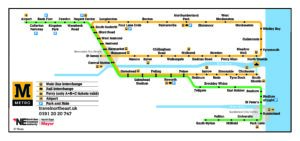
Appendix 2 – Metro student zone map
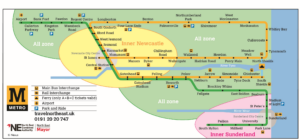
Appendix 3 – Transfare zone map